
Ultrasound for Research · I/O synchronisation
Synchronise ultrasound with external equipment
Many research setups need the ultrasound scanner to run in step with other equipment — signal generators, lasers, motion capture, EMG or a second scanner. ArtUs scanners provide line, frame and scan-state signals in both directions through six coaxial connectors.
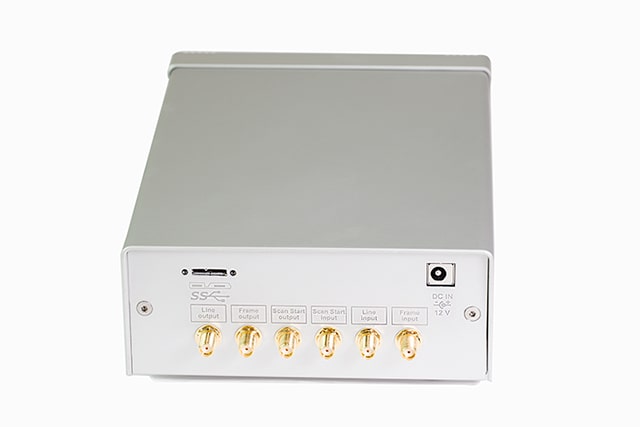
6 × SMA
3 inputs, 3 outputs
Line & frame
Trigger and sync signals
≈ 20 µs
From input edge to acquisition
3.3 V CMOS
Inputs 5 V tolerant
Availability
I/O synchronisation is standard on ArtUs USS-2H. ArtUs EXT-1H, EXT-2H and CEXT-1H can be equipped with an optional I/O module; I/O modules must be ordered separately.
ArtUs USS-2H
I/O synchronisation is built in — no additional module is required.
View scanner Optional I/O moduleArtUs EXT-1H
Available with an I/O module, ordered separately.
View scanner Optional I/O moduleArtUs EXT-2H
Available with an I/O module, ordered separately.
View scanner Optional I/O moduleArtUs CEXT-1H
Available with an I/O module, ordered separately.
View scannerMicrUs and SmartUs scanners have their own synchronisation port — see the synchronisation utilities.
Signals
The same six signals on every ArtUs scanner with I/O.
Outputs
Scanner → external device- Line outputfalling edge
Marks the start of data acquisition for one ultrasound line. Stays at logic 0 at the end of the line.
- Frame outputfalling edge
Marks the start of data acquisition for one frame. Returns to logic 1 at the end of the frame.
- ScanStart output
Logic 0 in FREEZE state, logic 1 in SCAN state.
Inputs
External device → scanner- Line inputrising edge
Starts acquisition of one ultrasound line approximately 20 µs after the edge.
- Frame inputrising edge
Starts acquisition of one frame approximately 20 µs after the edge. The number of frames per trigger is configurable; 0 means continuous scanning.
- ScanStart inputrising edge
Toggles between FREEZE and SCAN at each edge, like the Freeze button.
How to set it up
- 1
Connect
Connect the external equipment to the scanner's SMA connectors with 50 Ω coaxial cables.
- 2
Configure
Run ArtUs Sync Options, enable synchronisation and select the input mode — for example Ultrasound Frame Input and the number of frames per trigger.
- 3
Activate
Start Echo Wave II, or press the Probe button if it is already running, to apply the settings.
Example setup 1
Two ArtUs, two PCs, one signal generator
A signal generator drives the Frame input of both scanners, so frames from two PCs are acquired in step.
Example setup 2
Two ArtUs, one PC with two monitors
Twin scanners on a single PC, synchronised by an external signal generator through the Frame input.
Step-by-step instructions, timing diagrams and frame-rate tips are in the ArtUs I/O Module User Guide.
360° view
Move the mouse across a photo, drag it on a touch screen, or use the slider to rotate the scanner.

Downloads
Need synchronisation in your setup?
Tell us what you would like to synchronise, and we will suggest the right scanner and I/O configuration.